> ## Documentation Index
> Fetch the complete documentation index at: https://help.hivra.app/llms.txt
> Use this file to discover all available pages before exploring further.
# Hivra Affiliate Program: Referral Links, Commissions, and Payouts
> Earn 40% commission (up to $200 per referral) by sharing your Hivra referral link. Learn how to enroll, track referrals, and set up PayPal payouts.
The Hivra affiliate program lets you earn cash for sending new paying customers to Hivra. Once you enroll, you get a unique referral link to share anywhere — your referrals get a discount on their first month, and you earn a recurring commission on their subscription payments. Everything is tracked in your own **Affiliate dashboard**, including clicks, signups, commissions, and payouts.
Enrollment is open to any Hivra account, including the Free plan. You don't need to be a paying subscriber to become an affiliate.
## What you earn
| Detail | Amount |
| --------------------------------- | ------------------------------------------------------------------ |
| Commission rate | 40% of the plan subtotal (excluding tax) on each recurring payment |
| Lifetime cap | \$200 per referred customer |
| Discount for the person you refer | 30% off their first month |
| Attribution window | 90 days from the click on your referral link |
| Commission hold | 30 days before a commission is approved for payout |
| Minimum payout | \$50 approved balance, paid via PayPal |
Commissions are calculated on the plan subtotal your referral actually pays. If their first payment includes the 30% new-customer discount, that month's commission is based on the discounted amount rather than the full price.
## Enrolling in the affiliate program
Look for the **Earn 200** button in the top bar of your dashboard. If you haven't dismissed it, a popover may also appear below the button prompting you to **Refer a friend and get paid** — click **Get** **200** there, or click **Not Now** to dismiss it.
Clicking the button opens the **Invite Your Friends and Get Paid!** dialog, which summarizes the commission rate, lifetime cap, referral discount, attribution window, payout hold, and minimum payout, along with a note that self-referrals and abuse are blocked and that commissions may be reversed on refunds.
Click **Accept Terms**. Hivra generates your unique affiliate code and takes you straight to your new **Affiliate dashboard**.
Once you've enrolled, the header button changes from **Earn \$200** to **Affiliates** — click it any time to jump back into your dashboard.
## Your affiliate dashboard
The **Affiliate dashboard** (reached from the **Affiliates** button, or at **Dashboard → Affiliates**) is organized into three sections: **Overview**, **Referrals**, and **Commissions.**
 ### Overview
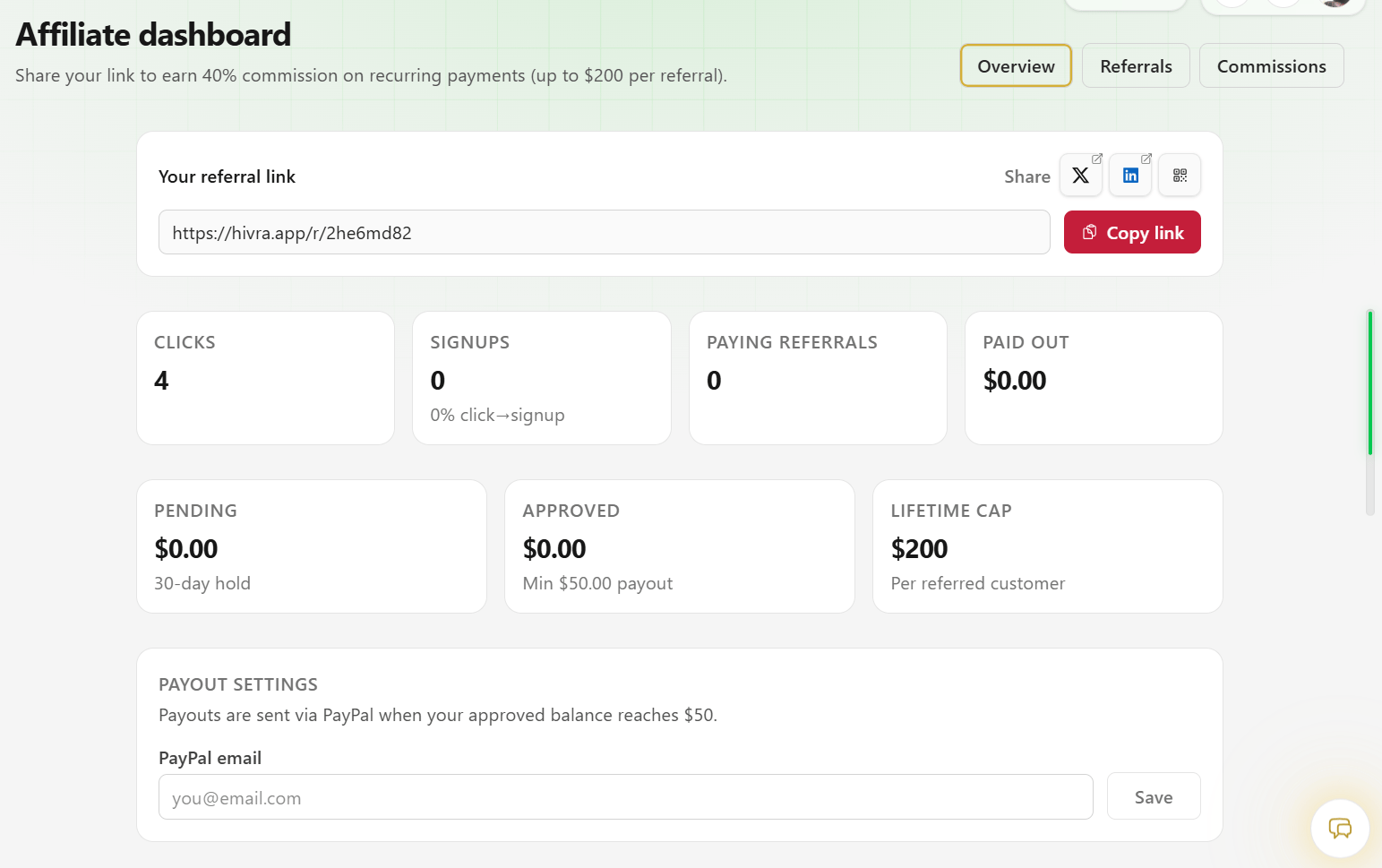
The Overview section is your home base. At the top, you'll find your referral link with a **Copy link** button and quick share icons for **X**, **LinkedIn**, and a QR code you can display or scan.
Below the link, stat cards summarize your performance:
* **Clicks** — total visits to your referral link.
* **Signups** — how many of those clicks turned into a Hivra account, plus your click-to-signup conversion rate.
* **Paying referrals** — how many of your referrals became paying subscribers.
* **Paid out** — total commissions paid to you so far.
* **Pending** — commissions still in their 30-day hold.
* **Approved** — commissions that have cleared the hold and are waiting for your next payout.
* **Lifetime cap** — the \$200 maximum commission per referred customer.
Use the share icons instead of copying the raw link when you want to post directly to X or LinkedIn, or use the QR code option to share your link in person or in a printed or on-screen flyer.
### Payout settings
In the **Payout settings** card, enter the **PayPal email** you want payouts sent to and click **Save**. Payouts are sent automatically once your approved balance reaches the \$50 minimum.
You must save a valid PayPal email before Hivra can pay out your approved commissions. Payout settings only accept a properly formatted email address.
### Notification settings
The **Notification settings** card lets you control how you're notified about affiliate activity:
* **New referral** — when someone signs up using your affiliate link.
* **Commission approved** — when a commission clears the 30-day hold and is ready for payout.
* **Payout sent** — when an approved balance is paid out to your PayPal account.
Adjust each one from its dropdown; changes save automatically.
### Payout history
Once you've received at least one payout, a **Payout history** table appears at the bottom of the Overview section, listing the amount, PayPal address, status, and date of each payout.
### Referrals
The **Referrals** tab lists everyone attributed to your link, with their current status, how much you've earned from them so far, and how much of the \$200 lifetime cap remains for that referral. The list is paginated as your referral count grows.
### Commissions
The **Commissions** tab lists every individual commission you've earned, with the amount, the referral's plan tier and billing period, its status (pending, approved, or paid), and the date it was created. This list is also paginated.
## How commissions and payouts work
Your referral link (in the form `hivra.app/r/yourcode`) sets a 90-day attribution cookie in their browser. If they sign up any time within that window, they're linked to you as your referral.
When your referral upgrades to Creator or Business, they automatically receive 30% off their first month's payment, and a commission is created for you.
New commissions start in **Pending** status while Hivra confirms the payment is not refunded or disputed.
After 30 days, the commission moves to **Approved** status and is added to your payout balance.
Once your approved balance reaches \$50, Hivra sends a payout to the PayPal email on file, and the commission moves to **Paid**.
This repeats on every recurring payment your referral makes, until you've earned the \$200 lifetime cap for that customer.
Self-referrals and other forms of abuse are not allowed and are blocked by Hivra. Commissions tied to a payment that is later refunded may be reversed, even if the commission was already approved.
## Related
* [Hivra Plans and Pricing](/account/plans)
* [Account Settings](/account/settings)
### Overview
The Overview section is your home base. At the top, you'll find your referral link with a **Copy link** button and quick share icons for **X**, **LinkedIn**, and a QR code you can display or scan.
Below the link, stat cards summarize your performance:
* **Clicks** — total visits to your referral link.
* **Signups** — how many of those clicks turned into a Hivra account, plus your click-to-signup conversion rate.
* **Paying referrals** — how many of your referrals became paying subscribers.
* **Paid out** — total commissions paid to you so far.
* **Pending** — commissions still in their 30-day hold.
* **Approved** — commissions that have cleared the hold and are waiting for your next payout.
* **Lifetime cap** — the \$200 maximum commission per referred customer.
Use the share icons instead of copying the raw link when you want to post directly to X or LinkedIn, or use the QR code option to share your link in person or in a printed or on-screen flyer.
### Payout settings
In the **Payout settings** card, enter the **PayPal email** you want payouts sent to and click **Save**. Payouts are sent automatically once your approved balance reaches the \$50 minimum.
You must save a valid PayPal email before Hivra can pay out your approved commissions. Payout settings only accept a properly formatted email address.
### Notification settings
The **Notification settings** card lets you control how you're notified about affiliate activity:
* **New referral** — when someone signs up using your affiliate link.
* **Commission approved** — when a commission clears the 30-day hold and is ready for payout.
* **Payout sent** — when an approved balance is paid out to your PayPal account.
Adjust each one from its dropdown; changes save automatically.
### Payout history
Once you've received at least one payout, a **Payout history** table appears at the bottom of the Overview section, listing the amount, PayPal address, status, and date of each payout.
### Referrals
The **Referrals** tab lists everyone attributed to your link, with their current status, how much you've earned from them so far, and how much of the \$200 lifetime cap remains for that referral. The list is paginated as your referral count grows.
### Commissions
The **Commissions** tab lists every individual commission you've earned, with the amount, the referral's plan tier and billing period, its status (pending, approved, or paid), and the date it was created. This list is also paginated.
## How commissions and payouts work
Your referral link (in the form `hivra.app/r/yourcode`) sets a 90-day attribution cookie in their browser. If they sign up any time within that window, they're linked to you as your referral.
When your referral upgrades to Creator or Business, they automatically receive 30% off their first month's payment, and a commission is created for you.
New commissions start in **Pending** status while Hivra confirms the payment is not refunded or disputed.
After 30 days, the commission moves to **Approved** status and is added to your payout balance.
Once your approved balance reaches \$50, Hivra sends a payout to the PayPal email on file, and the commission moves to **Paid**.
This repeats on every recurring payment your referral makes, until you've earned the \$200 lifetime cap for that customer.
Self-referrals and other forms of abuse are not allowed and are blocked by Hivra. Commissions tied to a payment that is later refunded may be reversed, even if the commission was already approved.
## Related
* [Hivra Plans and Pricing](/account/plans)
* [Account Settings](/account/settings)